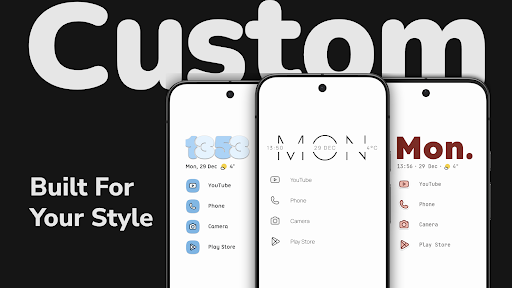
Niagara Launcher is a minimalist Android launcher designed to upgrade your phone by offering a clean, elegant, and customizable home screen. Focusing on productivity and easy customization, Niagara Launcher reduces clutter and allows you to effortlessly customize your home screen with themes, widgets, wallpapers, and icons, helping you make the most of your smartphone.
🏅 Awards
🏅 Among the Best Android Launchers in 2025 – Tom’s Guide
🏅 Among the Best Minimalist Launchers in 2025 – Geeky Gadgets
🏅 Among the Best Android Launchers to customize your phone in 2025 – Android Police
▌ Customization – Make your phone truly yours
🎨 Themes · Apply themes from our theme collection with just one tap.
🖌️ Custom App Icons · Discover a wide range of unique icon packs supporting all your apps.
🖼️ Built-In Wallpapers · Customize your home screen with our unique wallpaper collection.
🕰️ Clock Style · Choose from different clock styles to match your home screen theme.
📝 Custom Fonts · Customize your launcher experience with various fonts.
🎨 Material You · Dynamic theming adapts to your wallpaper on all Android versions.
🌓 Light & Dark Themes · Choose from different light and dark theme options.
▌ Productivity – Everything within reach
📄 Integrated Notifications · Read and reply directly from the home screen.
🌊 Wave Alphabet · Fast access to apps with intuitive one-handed operation.
📅 Calendar Widget · Stay organized with a clear and practical calendar widget.
🌤️ Weather Widget · Check the latest weather updates with the built-in weather widget.
📚 Widget Stack · Space-saving arrangement of up to four widgets.
📁 Pop-Up Folders · An efficient way to organize apps without cluttering your home screen.
🎮 Customizable Gestures · Navigate with gestures like double-tap to turn off the screen.
🔍 Advanced Search · Find contacts, search the web, and calculate instantly.
▌ Wellbeing – Reduce your screen time
⏳ Usage Breaker · Stay mindful of screen time with gentle reminders for apps you use too often.
🎯 Stay focused · Simplify and declutter your home screen for fewer distractions.
🔒 Hide Apps · Keep your app drawer clean by hiding apps you don’t need.
📩 Notification Summary · Bundle less important notifications for longer uninterrupted sessions.
⛔ Ad-Free · An undisturbed usage experience, even in the free version.
🔍 Discover More · Various other features await you in Niagara Launcher.
▌ Continuous Updates & Reliable Support
💻 Active Development · Constant improvements & new features for the launcher.
❤️ Helpful Support · Get quick and friendly assistance whenever you need it.
📲 Backup & Restore · Effortlessly transfer your home screen setup when switching phones.
▌ What Others Say
🏆 "Niagara Launcher for Android, which is, in theory, largely optimized for one-handed phone use but is also just a better, quieter way of organizing your home screen” - David Pierce, The Verge
🏆 „The Best Android Launcher for Big Phones“ - Joe Fedewa, How-To Geek
🏆 „A standout new Android launcher for ergonomic efficiency“ - JR Raphael
🏆 „Your best choice for a tall or folding phone“ - Ryne Hager, Android Police
Thank you for your interest in Niagara Launcher!
Download Niagara Launcher now and transform your phone!
---
📴 Why We Offer an Accessibility Service · Our accessibility service has the sole purpose of letting you quickly turn off your phone's screen with a gesture. The service is optional, disabled by default, and neither collects nor shares any data.
✏️️ Create, Share, and Discover Themes With Theme Studio Create your own themes with our new Theme Studio. Customize wallpapers, icons, clock styles, and text with a live preview, save multiple setups, and share them with friends or the community. This update also marks the beginning of our brand refresh and the launch of Mellowdrop Studio, our new independent software studio.
Hey, thanks for your detailed feedback! Your point about making Pro-only features easier to identify is valuable. It should be clear what requires a purchase before trying a feature. And there's certainly no need to apologize for choosing not to buy Pro. We appreciate your support regardless! -David
can't move the alphabet to left side. my thumb (on the left) block icons. and my apps are in 3 lanuguages. i have to remember what language a specific app's title is written in. not for me.
デベロッパーからの返信
Hi Newton, Niagara can also be operated from the left edge, although the alphabet itself is only shown on the right. We understand that this may still be inconvenient, especially when your apps use several different languages. -David
Hi there, thanks for your feedback. We understand that extra status messages can feel out of place in a launcher focused on keeping things clean and minimal. We appreciate you sharing your thoughts on this. -David
Hello there, thanks for your feedback and rating. Sorry that the home screen does not work properly for you when music apps are shown on the lock screen. Please contact us at [email protected] so we can check this with more details. You can also share it here: https://feedback.niagaralauncher.com/?b=67caf1aac392daef53b12d76 -David
Hi there, thanks for the detailed feedback and rating! We’re glad you enjoy Niagara’s clean look and outlined icons. We also appreciate your suggestion for additional ways to organize the app list. -David
 N