Compatible Models: GO Pop+ GO Sport+ JBuds Air Pro JBuds Air Pro ANC JBuds Air ANC (Gen 2) JBuds ANC 3 JBuds Air Sport (Gen 3) JBuds Mini Work Buds Epic Air ANC (Gen 2) Epic Air Sport (Gen 2) Epic Lab Edition GO Work (Gen 2) JBuds Lux ANC JBuds Sport ANC 4 Rewind 2 Flex Studio+ Studio Pro+ Epic Work ANC JBuds Open Sport GO Pop ANC Epic Sport ANC 3 Epic Open Sport GO Pods ANC JBuds Pods ANC GO Lux ANC Epic Lux Lab Edition Studio 2
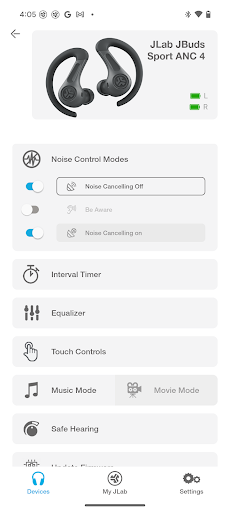
The new and improved JLab app offers complete customization for all JLab App compatible models. Adjust Noise Control settings, Be Aware, touch controls, safe listening levels, and sound to your personal preference – or use the presets for JLab Signature, Balanced, or Bass Boost. Plus, get software updates for your product right when they’re available.
Active Noise Cancellation Control With the new JLab App, you'll be able to increase the active noise canceling from off all the way to max ANC, (on your ANC compatible earbuds) while in the earbuds themselves you can only select on or off.
Be Aware Audio Bring the outside in. Use the JLab App to increase or decrease the amount of outside noise you let in by adjusting your Be Aware settings. (For Be Aware Compatible earbuds only)
EQ Customization Fine tune your sound by adjusting the equalizer settings. JLab products come set with three default settings - called Custom EQ3 Sound, which features JLab Signature, Balanced and Bass Boost and a 4th option 'Custom'. Use the JLab App to test and set your own equalizer settings by adjusting Bass (200, 280, 400 Hz levels), Mid-Range (550, 770, 1000, 2000 Hz levels) and Treble (4000, 8000, 16000 Hz levels).
Custom Controls JLab products come with controls in each earbud that control anything from volume, track changes, play/pause and more. If you'd like to switch the settings, you can customize your controls further via the app.
Safe Hearing All future JLab models will now support Safe Hearing. Switch between the default output, 95 dB, or 85 dB for a safe listening experience.
Hi, we are sorry you are running into issues connecting to the app, please reach out to us via email to [email protected] and we can provide some further assistance. We look forward to speaking with you!
Daniel Kang
★☆☆☆☆버전 1.7.1
Unable to pair what I have Sucks
개발자 답변
Hi, we are sorry you are running into issues connecting to the app, please reach out to us via email to [email protected] and we can provide some further assistance. With love from the Lab!
Rindy rksel
★☆☆☆☆버전 1.7.1
컨트롤을 수정하고 싶은데, 앱이 연결된 jbuds air pro를 감지하지 못해서 전혀 연결되지 않아요.
개발자 답변
Hi Rindy, have you installed our latest app under JLAB. We have transitioned from the JLAB Sound App. The JBuds Air Pro are supported by the new app as of now. If after the update, you are still experiencing issues please reach out to us via email to [email protected] for further assistance.
 J