 C
Android-app
Cast to TV - Screen Mirroring
Video Player & Cast to TV
screenmirroring.casttotv.tvcast.chromecastPaginaweergaven: 0
★ 4,619.908 beoordelingen
1,000,000+ downloadsGoogle Play-installaties
1.8.0Huidige versie op APKTube
Nov 10, 2026Laatst bijgewerkt
Schermafbeeldingen


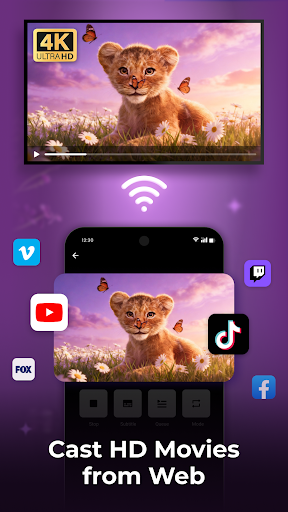


Over Cast to TV - Screen Mirroring
Cast to TV allows you to easily cast your phone screen to smart TV. With this app, you can quickly cast your videos, photos, and music to the big screen with just a few taps. Cast to TV supports the most popular streaming devices, letting you enjoy high-quality streaming of your favorite content in real time.
🌟 Key Features
- Cast movies, web video, photo slideshow, and more
- Easy to control TV: pause, fast forward, adjust volume, subtitle
- Screen Mirroring: Mirror your phone screen in real time to the bigger screen
- Support the most popular streaming devices
- Remote control for TV
- Built-in browser for web video cast
- Playlists: play media in shuffle, loop or repeat mode.
- Play History
- HD Video Player: enjoy a high quality watching experience
💡 Supported Devices:
- Smart TVs: Sony, Samsung, LG TV, etc.
- Apple TV
- Fire TV, Xbox
- Web Browser, PC, PS4
- Chromecast
📺 Cast to TV
Whether you want to watch your favorite TV shows, enjoy a live stream, or just show off your holiday photos, Cast to TV makes it easy. Just select your favorite movie and watch it in full HD.
✨ Screen Mirroring
Mirror your mobile device's screen on your TV, and show off photos and videos to your friends and family. It allows you to play your favorite games on the big screen, giving you a much more realistic and immersive experience.
🏆 Easy to Control
You can control basic video functions such as play, pause, adjust volume, switch between channels, and even enter text with the keyboard to search for movies.
🏅️ Web Browser
Cast to TV offers a built-in web browser that allows you to cast web videos to TV. It also offers a range of other features, including bookmark, playback history, and different resolutions. And you can block pop-ups and ads to keep unwanted advertisements from distracting you.
Thank you for choosing our Cast to TV app! If you have any suggestions or issues, please don't hesitate to contact us at [email protected].
App-informatie
- Pakketnaam
- screenmirroring.casttotv.tvcast.chromecast
- Ontwikkelaar
- Video Player & Cast to TV
- Versie
- 1.8.0
- Laatst bijgewerkt
- Nov 10, 2026
Wat is er nieuw
✨ Enables HD Mirroring for high-quality display
🌐 Enables Web Mirroring to mirror device screen to TV browser
🚀 UI and user experience optimized
App-versies
Kies een opgeslagen versie en de juiste apparaatvariant. Oudere versies missen mogelijk beveiligingsupdates.
Er zijn nog geen versies aan het archief toegevoegd.
Google Play-reviews
Deze reviews komen van Google Play en zijn niet op APKTube geplaatst. Bekijken op Google Play ↗
Er zijn geen reviews voor deze app in de gekozen taal gevonden.