1,000,000+ downloadsSố lượt cài đặt trên Google Play
2.0.2.1Phiên bản hiện tại trên APKTube
Oct 30, 2026Cập nhật lần cuối
Ảnh chụp màn hình
Giới thiệu JLab
Compatible Models: GO Pop+ GO Sport+ JBuds Air Pro JBuds Air Pro ANC JBuds Air ANC (Gen 2) JBuds ANC 3 JBuds Air Sport (Gen 3) JBuds Mini Work Buds Epic Air ANC (Gen 2) Epic Air Sport (Gen 2) Epic Lab Edition GO Work (Gen 2) JBuds Lux ANC JBuds Sport ANC 4 Rewind 2 Flex Studio+ Studio Pro+ Epic Work ANC JBuds Open Sport GO Pop ANC Epic Sport ANC 3 Epic Open Sport GO Pods ANC JBuds Pods ANC GO Lux ANC Epic Lux Lab Edition Studio 2
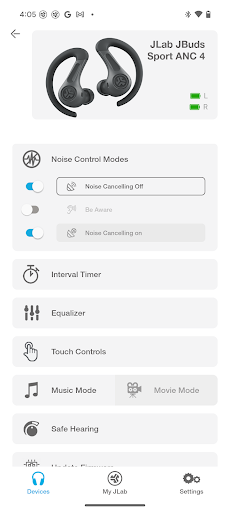
The new and improved JLab app offers complete customization for all JLab App compatible models. Adjust Noise Control settings, Be Aware, touch controls, safe listening levels, and sound to your personal preference – or use the presets for JLab Signature, Balanced, or Bass Boost. Plus, get software updates for your product right when they’re available.
Active Noise Cancellation Control With the new JLab App, you'll be able to increase the active noise canceling from off all the way to max ANC, (on your ANC compatible earbuds) while in the earbuds themselves you can only select on or off.
Be Aware Audio Bring the outside in. Use the JLab App to increase or decrease the amount of outside noise you let in by adjusting your Be Aware settings. (For Be Aware Compatible earbuds only)
EQ Customization Fine tune your sound by adjusting the equalizer settings. JLab products come set with three default settings - called Custom EQ3 Sound, which features JLab Signature, Balanced and Bass Boost and a 4th option 'Custom'. Use the JLab App to test and set your own equalizer settings by adjusting Bass (200, 280, 400 Hz levels), Mid-Range (550, 770, 1000, 2000 Hz levels) and Treble (4000, 8000, 16000 Hz levels).
Custom Controls JLab products come with controls in each earbud that control anything from volume, track changes, play/pause and more. If you'd like to switch the settings, you can customize your controls further via the app.
Safe Hearing All future JLab models will now support Safe Hearing. Switch between the default output, 95 dB, or 85 dB for a safe listening experience.
This update brings minor bug fixes and UI improvements.
Lịch sử phiên bản
Các phiên bản ứng dụng
Chọn phiên bản đã lưu và biến thể phù hợp với thiết bị. Phiên bản cũ có thể thiếu bản cập nhật bảo mật.
Chưa có phiên bản nào được thêm vào kho lưu trữ.
Đánh giá từ Google Play
Các đánh giá này đến từ Google Play, không được đăng trên APKTube. Xem trên Google Play ↗
Nhân Ông Thành
★★★★☆Phiên bản 1.9.9.0
không có tiếng việt trong ứng dụng
Phản hồi của nhà phát triển
We are continuously looking to expand our language support for other regions. Please continue to check back and let our support know in case of any additional questions/issues.
 J